
Naglunsad na ang StreamFluent: Ang Unang AI Voice Translation sa Buong Mundo para sa mga Live Streamer na Gumagana sa Real-Time
StreamFluent
Sa ngayon, sa isang lugar sa Twitch, isang streamer sa São Paulo ang gumagawa ng isa sa mga pinaka-kahanga-hangang speedrun na nakita ng internet. Ang kanilang komentaryo ay nakakaganyak. Ang kanilang chat ay sumasabog. Mayroon silang 8,000 sabay-sabay na manonood at bawat isa sa kanila ay nagsasalita ng Portuguese.
Sa kabilang panig ng planeta, ang isang English-speaking audience na milyon-milyon ay hindi malalaman na ang streamer na ito ay umiiral. Hindi dahil hindi sapat ang kalidad ng content. Hindi dahil wala ang gameplay. Kundi dahil sa isang invisible wall na nagtakda ng mga hangganan ng online entertainment mula nang unang nag-live ang webcam: wika.
Ngayon, gigibain na natin ang pader na iyon.
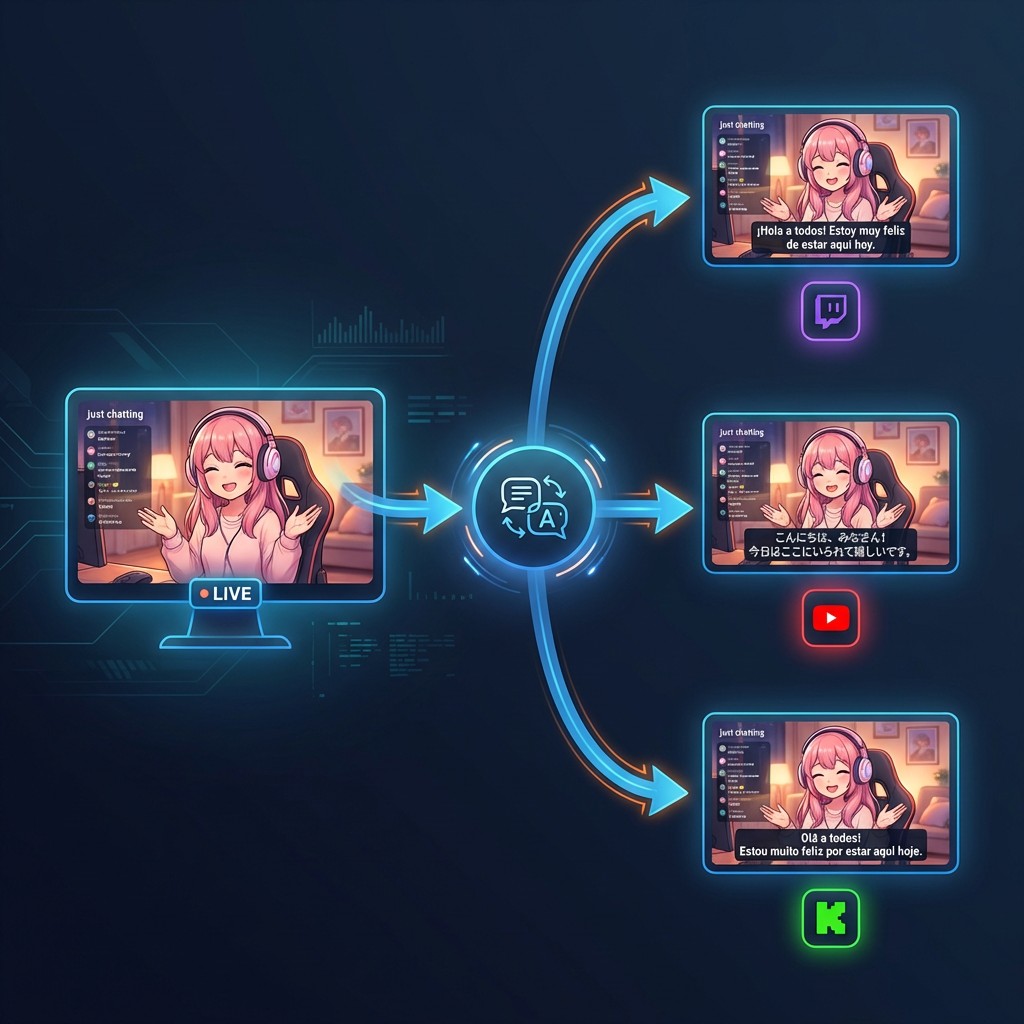
Ang StreamFluent ay ang unang real-time AI voice dubbing at caption platform sa mundo na binuo partikular para sa mga live streamer. Minsan ka lang mag-stream, sa iyong katutubong wika. Nakikinig ang StreamFluent, nagta-transcribe, nagsasalin, at muling binibigkas ang iyong stream — sa hanggang 15+ na wika — bawat isa ay inihatid sa sarili nitong channel sa Twitch, YouTube, Kick, o anumang RTMP-compatible na platform.
Hindi ito post-production dubbing. Hindi ito subtitles na idinagdag mo pagkatapos ma-upload ang isang VOD. Ito ay nangyayari live, sa sub-second latency, habang ikaw ay naglalaro, nagre-react, o nakikipag-chat sa iyong audience.
Ipaliwanag namin kung paano kami nakarating dito, kung ano ang aming binuo, at kung bakit naniniwala kami na binabago nito ang lahat para sa mga creator.
Ang Problema: Ang Wika ang Huling Hadlang sa Live Streaming
Nalutas na ng industriya ng streaming ang halos lahat ng iba pang problema sa pamamahagi. Maaari kang mag-live mula sa iyong silid-tulugan at maabot ang mga manonood sa bawat kontinente. Ang mga platform ay may mga global CDN na naghahatid ng video sa loob ng milliseconds. Ang mga discovery algorithm ay naglalantad ng content sa mga bagong audience sa buong orasan. Hinahayaan ng mga payment system ang mga tagahanga sa Tokyo na mag-tip sa isang creator sa Toronto.
Ngunit ang wika? Ang wika ay isa pa ring matigas na pader.
Isaalang-alang ang matematika. Mayroong humigit-kumulang 2.5 milyong aktibong streamer sa Twitch lamang. Ang karamihan sa kanila ay nag-stream sa isang wika. Ang Ingles ang nangingibabaw sa mga Western platform, ngunit ang pinakamabilis na lumalagong mga streaming community ay nasa Spanish, Portuguese, Japanese, Korean, at Hindi. Ang mga audience na ito ay napakalaki, nakatuon, at higit na nakahiwalay sa isa't isa.
Ang isang Spanish-speaking streamer na may hindi kapani-paniwalang gameplay at isang magnetic personality ay umaabot sa isang ceiling sa sandaling hindi nagsasalita ng Spanish ang kanilang potensyal na manonood. Totoo rin ito sa kabaligtaran — ang isang English creator na may tapat na komunidad ng 50,000 ay mahalagang walang abot sa 500-milyong malakas na Japanese-speaking internet.
Hindi ito isang maliit na problema. Ito ang pinakamalaking hindi pa nagagamit na growth lever sa buong creator economy. At hanggang ngayon, ang mga solusyon ay alinman sa wala o nakakatawang hindi praktikal:
- Manual translation? Kakailanganin mo ang isang human interpreter sa isang voice call, live, para sa bawat stream, sa bawat wika. Ang gastos pa lamang ay prohibitive. Ginagawa ng latency na hindi ito mapanood.
- Post-stream subtitles? Mas mahusay kaysa sa wala para sa mga VOD, ngunit wala silang ginagawa para sa live viewership — kung saan naroon ang pera, ang komunidad, at ang momentum.
- Browser-based caption overlays? Mayroong ilang mga tool, ngunit ang mga ito ay humahawak lamang ng mga text caption, nangangailangan ng mga kumplikadong OBS plugin setup, at hindi nalulutas ang pangunahing problema: ang iyong boses ay nasa isang wika pa rin.
Kailangan ng streaming world ng isang bagay na ganap na bago. Isang sistema na maaaring magproseso ng pananalita, isalin ito, at mag-synthesize ng isang bagong boses — lahat sa real time, lahat nang hindi binabago ng streamer ang kanilang workflow.
Iyon ang aming binuo.
Ano ang Aming Binuo: Real-Time AI Dubbing para sa Live Streams
Ang StreamFluent ay isang real-time AI pipeline na nakaupo sa pagitan ng iyong streaming encoder (OBS Studio, Streamlabs, o anumang RTMP-compatible na software) at ng iyong mga destination platform. Narito ang nangyayari kapag nag-live ka:
- Nag-stream ka nang normal sa iyong katutubong wika. Walang nagbabago sa iyong setup maliban sa RTMP destination URL sa OBS.
- Ini-ingest ng StreamFluent ang iyong stream sa pamamagitan ng aming mga RTMP relay server. Ang iyong video ay dumadaan nang hindi nagalaw — hindi namin kailanman muling ini-encode ang iyong video.
- Pinoproseso ng aming AI pipeline ang iyong audio sa real time: ang speech recognition ay nagta-transcribe ng iyong sinasabi, ang machine translation ay nagko-convert nito sa iyong mga target na wika, at ang neural text-to-speech ay nag-synthesize ng isang bagong voice track para sa bawat wika.
- Ang bawat isinaling stream ay inihatid sa sarili nitong destination — isang hiwalay na Twitch channel, YouTube stream, o Kick channel — kumpleto sa dubbed audio track at opsyonal na burned-in captions.
Ang resulta: minsan ka lang mag-stream. Ang iyong audience ay nanonood sa labinlimang wika. Ang bawat bersyon ay natural ang tunog, nananatiling naka-sync, at dumarating na may sub-second latency.
Hatiin natin ang bawat piraso.
Speech Recognition (STT)
Ang unang yugto ng pipeline ay automatic speech recognition. Pinoproseso ng STT engine ng StreamFluent ang iyong audio sa real time, kino-convert ang pananalita sa text na may mataas na katumpakan kahit sa maingay na gaming environment. Na-optimize namin partikular para sa streaming use case — mabilis magsalita na komentaryo, background game audio, magkakapatong na tunog, at ang pangkalahatang kaguluhan ng isang live broadcast.
Machine Translation
Kapag mayroon na kaming iyong transcript, kino-convert ng aming translation layer ito sa iyong mga naka-configure na target na wika. Kasalukuyan naming sinusuportahan ang 15 wika: Spanish, Japanese, Portuguese, French, German, Korean, Chinese (Mandarin), Italian, Russian, Arabic, Hindi, Turkish, Dutch, Polish, at Thai — na may higit pang paparating.
Ang translation engine ay naka-tune para sa conversational, informal speech — ang paraan kung paano talaga magsalita ang mga streamer — hindi ang matigas, pormal na output na makukuha mo mula sa isang generic na document translator.
Neural Text-to-Speech (TTS)
Dito nangyayari ang mahika. Hindi lamang nagpapakita ang StreamFluent ng isinaling text. Ito ay nagsasalita nito. Bumubuo ang aming TTS engine ng isang natural-sounding na boses sa target na wika, na-synthesize sa real time.
Sa aming Pro plan, maaari kang lumikha ng isang custom voice model mula sa isang 30-segundong audio sample lamang. Natutunan ng sistema ang mga katangian ng iyong boses — tono, cadence, energy — at inilalapat ang mga ito sa isinaling output. Ang iyong Spanish stream ay parang ikaw na nagsasalita ng Spanish, hindi isang generic na robot.
Sa aming Business plan, inilulunsad namin ang buong voice replication na may emotion preservation — dadalhin ng dubbed voice ang iyong excitement, frustration, at humor sa iba't ibang wika. (Paparating na ang feature na ito, at tinawag ito ng mga early tester na "uncanny.")
Video Passthrough
Isang kritikal na desisyon sa disenyo: hindi namin kailanman muling ini-encode ang iyong video. Ang iyong 1080p60 o 4K stream ay dumadaan sa aming mga relay server bit-for-bit. Hinahawakan lamang namin ang audio track (at opsyonal na i-burn in ang caption overlays). Nangangahulugan ito ng zero quality loss, minimal na idinagdag na latency, at walang dagdag na GPU cost sa iyong dulo.
Paano Ito Gumagana: Setup sa Ilalim ng 2 Minuto
Kami ay nahumaling sa paggawa ng StreamFluent na nakakatawang madaling i-set up. Walang mga plugin na kailangang i-install, walang mga virtual audio cable na kailangang i-configure, walang mga browser source na kailangang paghirapan. Narito ang buong flow:
Hakbang 1: Gumawa ng Iyong Account
Mag-sign up sa streamfluent.ai gamit ang iyong email o kumonekta nang direkta sa iyong Twitch, YouTube, o Google account. Ang free tier ay magagamit kaagad — walang kinakailangang credit card.
Hakbang 2: I-set Up ang Iyong Boses
Para sa mga Pro at Business user, mag-record ng isang 30-segundong voice sample nang direkta sa dashboard. Ginagamit ito ng aming sistema upang buuin ang iyong custom voice profile. Maaari mong ayusin ang speaking rate (0.5x hanggang 2.0x) at pitch (-12 hanggang +12 semitones) upang i-fine-tune kung paano ang tunog ng iyong dubbed voice.
Ang mga free tier user ay nakakakuha ng access sa aming mataas na kalidad na standard TTS voices — natural pa rin ang tunog, hindi lamang personalized sa iyong partikular na boses.
Hakbang 3: Idagdag ang Iyong Mga Destination
Dito mo kino-configure kung saan pupunta ang bawat wika. Para sa bawat target na wika, tinukoy mo:
- Ang wika (hal., Spanish, Japanese)
- Ang platform (Twitch, YouTube, Kick, o anumang custom RTMP URL)
- Ang stream key para sa channel na iyon
- Ang dubbing mode: full AI dubbing, captions only, o pareho
Maaari kang magpatakbo ng maraming destination hangga't pinapayagan ng iyong plan — isa sa Free tier, hanggang tatlo sa Pro, at walang limitasyon sa Business.
Hakbang 4: Ikonekta ang OBS at Mag-Go Live
Narito ang bahagi na nakakagulat sa lahat: binabago mo lamang ang iyong stream URL sa OBS. Iyon lang.
Pumunta sa OBS Studio → Settings → Stream → piliin ang "Custom..." → i-paste ang iyong StreamFluent RTMP URL at stream key. Ang mga ito ay awtomatikong nabuo sa iyong dashboard.
Server: rtmp://ingest.streamfluent.ai/live
Stream Key: (ang iyong natatanging key mula sa dashboard)
Pindutin ang "Start Streaming" sa OBS. Kinukuha ng StreamFluent mula doon. Ang iyong orihinal na stream ay pupunta sa iyong pangunahing channel (kung nakapag-configure ka ng isang passthrough destination), at ang bawat isinaling bersyon ay pupunta sa kani-kanilang platform channel.
Walang mga plugin. Walang mga virtual audio driver. Walang mga browser source. Kung ang iyong encoder ay maaaring mag-output ng RTMP — at halos lahat ng mga ito ay kaya — gumagana ito sa StreamFluent.
Mga Caption at Dubbing: Buong Kontrol, Bawat Destination
Isa sa mga pinaka-hiniling na feature sa panahon ng aming beta ay ang granular na kontrol sa mga caption at dubbing sa bawat destination. Iba-iba ang mga kagustuhan ng iba't ibang audience, at gusto naming bigyan ang mga streamer ng kumpletong flexibility.
Narito kung paano ito gumagana:
Mga Dubbing Mode
Ang bawat destination ay maaaring itakda sa isa sa tatlong mode:
- Auto Dub: Kung ang destination language ay naiiba sa iyong source language, inilalapat ang full AI voice dubbing. Ito ang default at ang pinaka-karaniwang setting.
- Captions Only: Ang iyong orihinal na boses ay pinananatili, ngunit ang mga isinaling caption ay naka-burn sa video. Mahusay para sa mga audience na mas gustong marinig ang orihinal na boses ngunit nangangailangan ng tulong sa pagsasalin.
- Original Only: Ang stream ay dumadaan nang walang dubbing at walang mga caption. Kapaki-pakinabang para sa iyong "home" language destination.
Burned-In Captions
Ang caption system ng StreamFluent ay nagre-render ng isinaling text nang direkta sa video feed — walang kinakailangang viewer-side extension o setting. Nakikita ng lahat ng nanonood ang mga caption, anuman ang kanilang device o platform.
Maaari mong i-customize:
- Posisyon: Bottom center o top center
- Laki ng font: 16px hanggang 48px (default 24px)
- Wika: Tumutugma ang mga caption sa destination language
Gumagana ang mga caption nang nakapag-iisa sa dubbing. Maaari kang magpatakbo ng captions-only sa ilang mga destination at full dubbing sa iba. Maaari mo ring patakbuhin ang pareho — dubbed audio na may katugmang mga caption — para sa maximum na accessibility.
Audio Mixing
Kapag aktibo ang dubbing, awtomatikong hinahawakan ng StreamFluent ang audio mixing:
- Orihinal na volume ng audio: Default sa 20% (ang iyong orihinal na boses ay nagiging isang banayad na background, pinapanatili ang natural na mga tunog ng stream)
- Dubbed audio volume: Default sa 100%
- Auto-ducking: Kapag nagsasalita ang dubbed voice, awtomatikong ibinababa ang orihinal na audio. Kapag may katahimikan (gameplay audio lamang, walang pananalita), bumabalik ang orihinal na audio.
Ang lahat ng ito ay naaayos bawat stream mula sa dashboard.
Binuo para sa Pagiging Maaasahan: Ano ang Nangyayari Kapag May Mali
Ang live streaming ay hindi mapagpatawad. Kung may nasira, walang "undo." Binuo namin ang StreamFluent na may ganitong katotohanan sa core ng bawat desisyon sa arkitektura.
Mga Latency Mode
Ang iba't ibang use case ay nangangailangan ng iba't ibang latency-quality tradeoffs. Nag-aalok ang StreamFluent ng tatlong mode:
- Ultra-Low Latency (< 500ms): Para sa competitive gaming at mabilis na interaction. Magagamit sa Business plan.
- Balanced (< 1 segundo): Ang inirerekomendang default para sa karamihan ng mga streamer. Magagamit sa Pro at Business.
- Quality (< 2 segundo): Binibigyang-priyoridad ang katumpakan ng pagsasalin kaysa sa bilis. Pinakamahusay para sa talk-heavy content.
Fallback Behavior
Kung nakatagpo ang AI pipeline ng isang isyu sa kalagitnaan ng stream — isang maikling network hiccup, isang panandaliang pagkaantala sa pagproseso — hindi lamang nagka-crash o tumatahimik ang StreamFluent. Kino-configure mo kung ano ang mangyayari:
- Pass Through (default): Ang orihinal, hindi isinaling audio ay output hanggang sa makabawi ang pipeline. Naririnig ka ng iyong audience sa iyong katutubong wika sa loob ng ilang sandali, pagkatapos ay tuluy-tuloy na nagpapatuloy ang dubbing.
- Mute: Ang dubbed audio track ay tumatahimik nang maikli. Kapaki-pakinabang kung mas gusto mong magkaroon ng katahimikan kaysa sa hindi isinaling audio.
- Show Overlay: Isang maikling on-screen na mensahe ang nagpapahiwatig na pansamantalang hindi magagamit ang pagsasalin.
Live Monitoring Dashboard
Habang ikaw ay live, binibigyan ka ng StreamFluent dashboard ng isang real-time na command center:
- Per-destination status: Tingnan kung ang bawat language output ay malusog, kasama ang mga bilang ng manonood at latency
- Mga antas ng audio: Visual meters para sa bawat output stream
- Live transcription feed: Panoorin ang real-time na transcript sa bawat wika, na may mga tab upang lumipat sa pagitan ng mga ito
- TTS preview: Pakinggan ang dubbed audio nang direkta sa iyong browser upang i-verify ang kalidad
- Mga kontrol sa kalagitnaan ng stream: Paganahin o huwag paganahin ang mga indibidwal na destination nang hindi pinapahinto ang iyong stream
Ang Bisyon: Isang Mundo Kung Saan Ang Bawat Streamer ay May Global Audience
Sinimulan namin ang StreamFluent dahil naniniwala kami na hindi dapat tukuyin ng wika ang ceiling ng isang creator.
Ang internet ay dapat na walang hangganan. At sa maraming paraan, ito ay — maaari kang manood ng isang stream mula sa kahit saan sa mundo, kaagad. Ngunit ang "panonood" at "pag-unawa" ay dalawang magkaibang bagay. Ang isang manonood sa Seoul ay maaaring technically na makapag-load ng isang Brazilian Twitch channel, ngunit kung hindi nila maintindihan ang isang salitang sinasabi, aalis sila sa loob ng ilang segundo.
Lumilikha ito ng isang invisible segregation. Ang streaming world ay nahahati sa mga language silo, at ang mga creator ay nakulong sa loob ng mga ito. Ang isang mahusay na entertainer sa Mexico City ay hindi kailanman organically na maaabot ang Japanese market. Ang isang Korean variety streamer na may 100,000 tapat na tagasunod ay walang landas sa English-speaking audience na 10x na mas malaki.
Ang StreamFluent ang tulay.
Nakikita namin ang isang hinaharap kung saan:
- Ang isang streamer sa Buenos Aires ay nag-go live at sabay-sabay na nagpapasaya sa mga audience sa Tokyo, Berlin, Mumbai, at Los Angeles — lahat ay naririnig ang stream sa kanilang sariling wika, sa isang boses na parang boses ng creator.
- Ang wika ay hindi na isang variable sa discovery algorithm. Ang kalidad ng content ang mahalaga.
- Ang creator middle class ay lumalawak sa buong mundo, dahil ang talento ay pantay na ipinamamahagi sa iba't ibang wika ngunit ang pagkakataon ay hindi na kailangang maging.
- Ang mga multilingual community ay nabuo sa paligid ng mga creator, na may chat translation at cross-language interaction bilang isang native na feature (oo, pinagtatrabahuhan din namin iyon).
Ito ay isang malaking bisyon. Wala pa kami doon. Ngunit sa paglulunsad ngayon, ang pundasyon ay nasa lugar na.
Pagpepresyo: Magsimula nang Libre, Mag-Scale Habang Lumalaki Ka
Dinisenyo namin ang pagpepresyo ng StreamFluent upang maging accessible sa mga creator sa bawat antas.
Free Plan — $0/buwan
- 30 caption minutes at 15 dubbed minutes bawat buwan
- 1 target na wika
- Standard TTS voices
- Buong access sa live monitoring dashboard
- Walang kinakailangang credit card
Ang isang tipikal na 1-oras na stream ay gumagamit ng humigit-kumulang 30 minuto ng caption time at 35 minuto ng dubbed time (sinusukat namin ang actual speech processing time, hindi wall-clock time — kaya ang mga paghinto, mga segment na gameplay-only, at katahimikan ay hindi binibilang). Binibigyan ka ng Free plan ng sapat upang subukan ang isang buong stream at maranasan ang kalidad nang personal.
Pro Plan — $29/buwan
- 600 caption minutes at 300 dubbed minutes bawat buwan (~20 oras ng streaming)
- Hanggang 3 target na wika
- Custom voice model mula sa isang 30-segundong sample
- RTMP relay distribution sa maraming platform
- Mga kontrol sa audio mixing
- Configurable spend limit para sa overage
- 14-araw na libreng pagsubok
Business Plan — $79/buwan
- Walang limitasyong caption minutes at 1,200 dubbed minutes bawat buwan (~80 oras ng streaming)
- Walang limitasyong target na wika
- Ultra-low latency mode (< 500ms)
- Advanced voice tuning
- Voice replication na may emotion preservation (paparating na)
- Priority support
Enterprise — Custom na Pagpepresyo
- Walang limitasyong lahat
- Dedicated relay infrastructure
- Custom API integration
- SLA guarantees
- White-label options
Ang lahat ng bayad na plan ay gumagamit ng precision metering — binibilang lamang namin ang mga segundo kung saan talagang gumagawa ng trabaho ang aming AI. Kung tahimik kang naglalaro sa loob ng 10 minuto, iyon ay 0 caption minutes at 0 dubbed minutes. Nagbabayad ka para sa kung ano ang iyong ginagamit, at wala nang iba pa.
Kasama rin sa mga bayad na plan ang isang configurable spend limit kaya hindi ka nagulat sa mga overage charge. Itakda ito sa $0 upang hard-stop sa iyong mga kasamang minuto, o alisin ang cap nang buo para sa walang patid na streaming.
Subukan Ito Ngayon
Live na ang StreamFluent. Ang free tier ay magagamit ngayon sa streamfluent.ai. Walang credit card. Walang commitment. Mag-sign up lamang, i-paste ang isang RTMP URL sa OBS, at mag-stream sa mundo.
Kung ikaw ay isang creator na nagtaka kung ano ang maaaring maging hitsura ng iyong audience nang walang hadlang sa wika — ito ang iyong sagot.
Kung ikaw ay isang manonood na nag-click palayo mula sa isang hindi kapani-paniwalang stream dahil hindi mo maintindihan ang wika — ang mga araw na iyon ay bilang na.
Binuo namin ang StreamFluent dahil naniniwala kami na ang pinakamahusay na content ay dapat manalo, anuman ang wika nito. At simula ngayon, kaya na nito.
Ang iyong boses. Bawat wika. Tara na.
Magsimula ng Dubbing nang Libre →
Sinusuportahan ng StreamFluent ang Twitch, YouTube, Kick, at anumang RTMP-compatible na platform. Kasalukuyang magagamit sa 15 wika na may higit pang regular na idinagdag. Mga tanong? Makipag-ugnayan sa amin sa support@streamfluent.ai o tingnan ang aming documentation.